Decompressor Upward Dynamics Plugin
Bring movement back into overly controlled audio. Decompressor is an upward dynamics processor designed to exaggerate the natural level differences that still exist in a signal. When the detected RMS level rises above the threshold, the processor increases level according to the selected ratio, helping flat material feel more animated and responsive.
Make rigid audio breathe
Decompressor is especially useful on drum loops, drum groups and other material whose level has become too consistent. It can bring forward existing accents, strengthen contrasts between hits and add a sense of motion without replacing the original performance. The Dry/Wet control makes parallel processing straightforward, from subtle movement to deliberately exaggerated dynamics.
- Add level contrast to flat drum loops and percussion
- Emphasize existing accents in drum groups
- Create more movement in overly controlled material
- Blend processed and original signal for parallel upward expansion
Seven focused controls
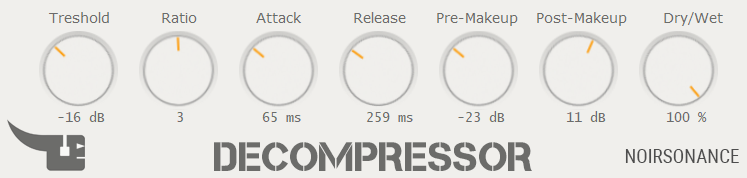
- Threshold sets the level above which expansion begins, from -24 dB to 0 dB.
- Ratio controls the strength of the upward expansion, from 1 to 5.
- Attack sets how quickly the processor responds, from 1 to 200 ms.
- Release controls how quickly it relaxes, from 20 to 800 ms.
- Pre-Gain drives the signal into the detector and processing path.
- Makeup adjusts the output level after dynamics processing.
- Dry/Wet blends the processed result with the original signal.
What Decompressor does not do
Decompressor reshapes level variations that are still present in the audio. It cannot reconstruct information permanently removed by clipping, hard limiting or destructive processing. Start with conservative Ratio and Dry/Wet settings, then adjust the timing to follow the groove.
Download and formats
The download contains a Windows installer and a macOS package with AU and VST3 versions. Decompressor 1.0 is offered as a free / pay-what-you-want download directly from NoirSonance.
Download integrity: ZIP SHA-256 AE60F5BAB537851BE53559C129B5FB2DCE088784F2EB976EF760884B3C99B060
Installation notes
Because NoirSonance software is distributed independently and may not yet have established signing reputation on every device, Windows or macOS may display a security prompt. This does not by itself indicate malicious software. Use the normal per-application approval process described in the NoirSonance Installation Help; never disable system-wide security protections.
Looking for conventional downward compression instead? Explore the D-Comp Classic or browse all NoirSonance dynamics tools.